Allowlist Settings
The Allowlist Settings section allows you to configure domain and URL authorization for enhanced security. Web3Auth requires explicit allowlisting of domains and URLs that are authorized to use your project's Web3Auth SDK, providing protection against unauthorized usage and potential security threats.
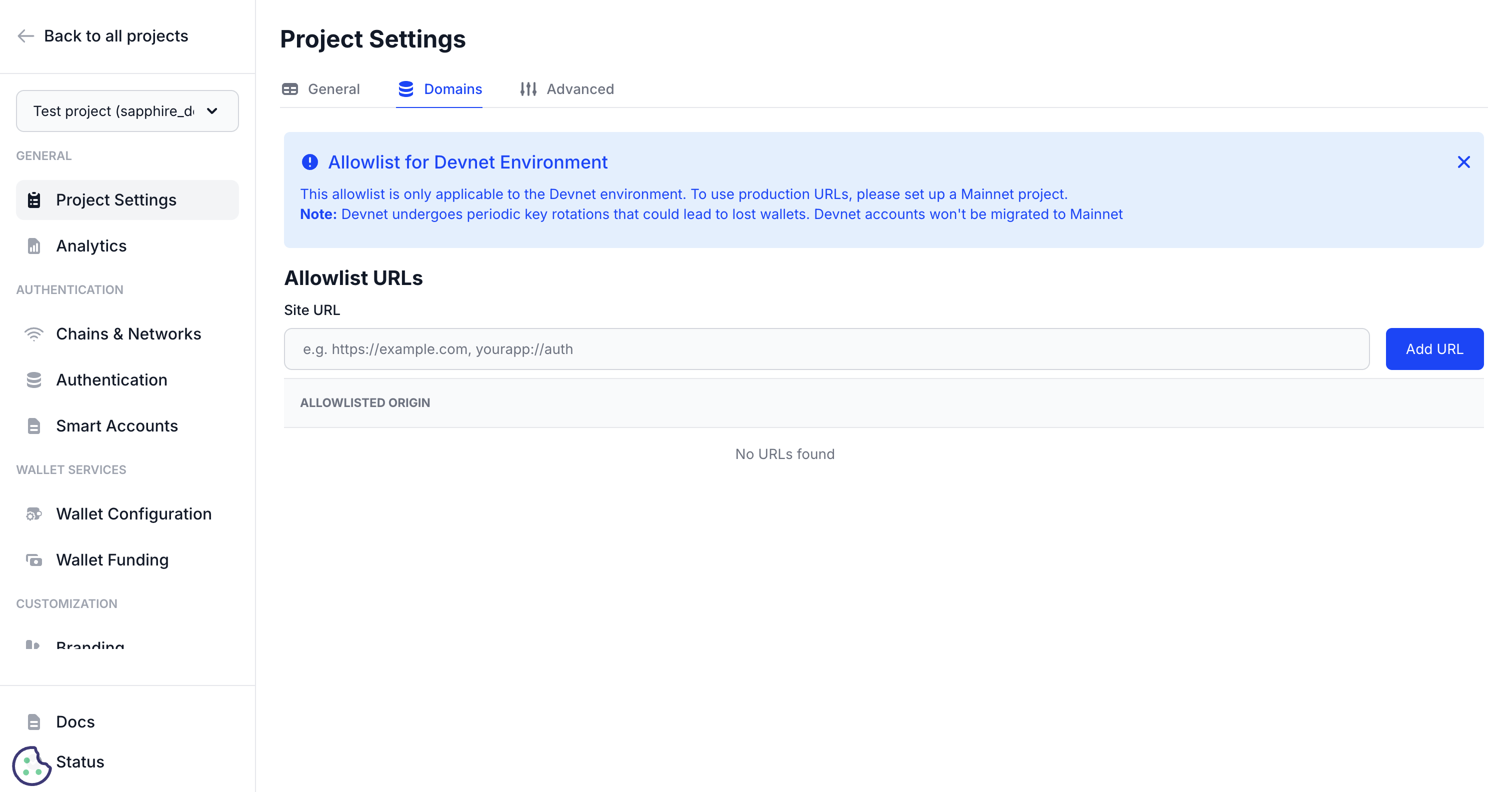
Domain authorization overview
Domain allowlisting is a critical security feature that prevents unauthorized applications from using your Web3Auth project credentials. Only domains and URLs explicitly added to your allowlist can successfully authenticate users through your Web3Auth configuration.
Security benefits
- Prevents credential theft: Unauthorized sites cannot use your Client ID
- Protects user data: Ensures authentication flows only occur on approved domains
- Compliance ready: Meets security standards for production applications
- Fraud prevention: Blocks malicious sites from impersonating your application
Web application allowlisting
Supported URL formats
Embedded Wallets supports various URL formats for comprehensive domain coverage:
- Standard domains
- Development environments
- Subdomain patterns
- Port-specific URLs
https://myapp.com
https://www.myapp.com
https://app.mycompany.com
http://localhost:3000
http://localhost:8080
https://dev.myapp.com
https://staging.myapp.com
https://*.myapp.com (covers all subdomains)
https://feature-*.myapp.com (wildcard patterns)
https://myapp.com:8443
http://localhost:3000
http://127.0.0.1:8080
Adding web domains
- Navigate to Project Settings → Allowlist.
- Click Add Domain or similar button.
- Enter the complete URL including protocol (http:// or https://).
- Verify the domain (if required).
- Save the configuration.
- Always use HTTPS for production domains
- Include all necessary subdomains
- Add development and staging environments
- Test authentication after adding domains
Mobile application allowlisting
Bundle identifiers
For mobile applications, allowlist the app's bundle identifier or package name:
- iOS Bundle IDs
- Android Package Names
com.yourcompany.yourapp
com.yourcompany.yourapp.staging
com.yourcompany.yourapp
com.yourcompany.yourapp.debug
Deep link schemes
Mobile applications using deep links should allowlist their custom URL schemes:
- Custom schemes
- iOS: universal links
- Android: app links
yourapp://auth
com.yourcompany.yourapp://callback
https://yourapp.com/auth/callback
https://yourapp.com/auth/callback
Environment-specific configuration
Development environment
For development and testing:
http://localhost:3000
http://localhost:8080
http://127.0.0.1:3000
https://dev.yourapp.com
https://staging.yourapp.com
Development Tips:
- Allowlist common development ports
- Include both localhost and 127.0.0.1
- Add staging and testing environments
- Use HTTP for local development (HTTPS for staging)
Production environment
For Sapphire Mainnet projects, at least one domain must be allowlisted before the SDK can be used in production. This is a mandatory security requirement.
Production Checklist:
- ✅ All production domains allowlisted
- ✅ HTTPS enforced for all domains
- ✅ Subdomain coverage complete
- ✅ Mobile bundle IDs added
- ✅ Deep link schemes configured
- ✅ Remove development URLs
Wildcard domains
Subdomain wildcards
Use wildcard patterns to cover multiple subdomains efficiently:
- Single-level wildcard
- Multi-level wildcards
https://*.myapp.com
Covers: https://api.myapp.com, https://admin.myapp.com, https://user.myapp.com
https://*.*.myapp.com
Covers: https://api.v1.myapp.com, https://admin.staging.myapp.com
Dynamic subdomains
For applications with dynamic subdomains (multi-tenant apps):
https://*.myapp.com
https://tenant-*.myapp.com
https://*.saas.myapp.com
Verification process
Domain verification
Some domains may require verification to ensure ownership:
- DNS Verification: Add a TXT record to your domain's DNS
- File Upload: Upload a verification file to your web server
- HTML Meta Tag: Add a meta tag to your website's homepage
Verification status
Monitor the verification status in your dashboard:
- ✅ Verified: Domain is confirmed and active
- ⏳ Pending: Verification in progress
- ❌ Failed: Verification unsuccessful, requires attention
Common issues and solutions
Authentication failures
Problem: Users cannot authenticate on your domain Solutions:
- Verify the domain is in your allowlist
- Check for typos in the domain name
- Ensure protocol (http/https) matches exactly
- Confirm subdomain patterns are correct
Development environment issues
Problem: Local development not working Solutions:
- Add
http://localhost:PORTto allowlist - Include
http://127.0.0.1:PORTas alternative - Check if your development server uses a different port
- Verify protocol matches (http vs https)
Mobile app issues
Problem: Mobile authentication failing Solutions:
- Verify bundle ID matches exactly
- Check deep link scheme configuration
- Ensure URL schemes are properly allowlisted
- Test with both debug and release builds
Security best practices
Regular audits
- Monthly reviews: Check allowlist for unused domains
- Remove stale entries: Delete old development or staging URLs
- Monitor access: Review authentication patterns for anomalies
- Update documentation: Keep domain lists current for your team
Principle of least privilege
- Minimal domains: Only allowlist necessary domains
- Specific patterns: Avoid overly broad wildcard patterns
- Environment separation: Use different projects for dev/staging/prod
- Regular cleanup: Remove domains when no longer needed
Compliance considerations
- Data residency: Consider where authentication occurs
- Privacy regulations: Ensure allowlisted domains comply with privacy laws
- Security standards: Meet industry requirements for domain authorization
- Audit trails: Maintain records of domain modifications
Advanced configuration
- CDN and load balancer support
- Multi-region deployments
- API gateway integration
For applications using CDNs or load balancers:
https://cdn.myapp.com
https://lb.myapp.com
https://edge-*.myapp.com
For global applications with regional domains:
https://us.myapp.com
https://eu.myapp.com
https://asia.myapp.com
https://*.global.myapp.com
For applications behind API gateways:
https://api.myapp.com
https://gateway.myapp.com
https://*.api.myapp.com
Next steps
- Project Settings - Configure basic project information
- Advanced Project Settings - Access advanced configuration options
- Session Management - Control session duration and behavior